For roofing, HVAC, plumbing and electrical
Your office manager is the only person who knows how any of this works.
Crewmanual records how your office actually runs — in ServiceTitan, Jobber, Housecall Pro, JobNimbus, AccuLynx, QuickBooks, whatever you use — and turns it into a manual anyone can follow. So the week she takes a vacation, or takes another job, the work still goes out the door.
Nobody wrote any of it down. They never do.
It lives in one person’s head
How to bill a warranty job. Which box to tick so the tech gets paid right. The workaround for the thing that’s been broken since 2023. None of it is written anywhere.
Training is someone shoulder-surfing
A new hire sits next to whoever’s busiest and watches for two weeks. Then asks the same eleven questions for another month, because nobody remembers everything they saw once.
Writing it down never happens
Everyone agrees you should have SOPs. Nobody has an afternoon to screenshot forty screens and write captions for them. So it stays on the list for another year.
How it works
Hit record, then just do the job
Pull the permit, build the estimate, close out the invoice — whatever you normally do. Crewmanual sits in your browser and watches. No setup, no consultant, no meeting.
Get a guide back, already written
Every click becomes a numbered step with a screenshot of exactly what the screen looked like. Fix a word, delete a step, done. What used to be an hour of writing takes about four minutes.
Your guides become the manual
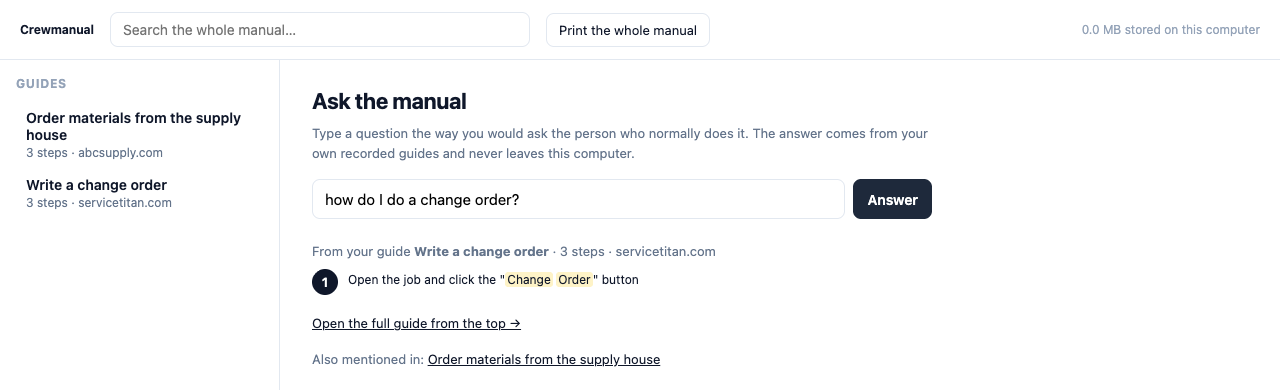
All of them in one place, searchable. A new hire types “how do I do a change order” and gets the answer instead of walking to someone’s desk. Print the whole thing as a handbook when you want it on paper.
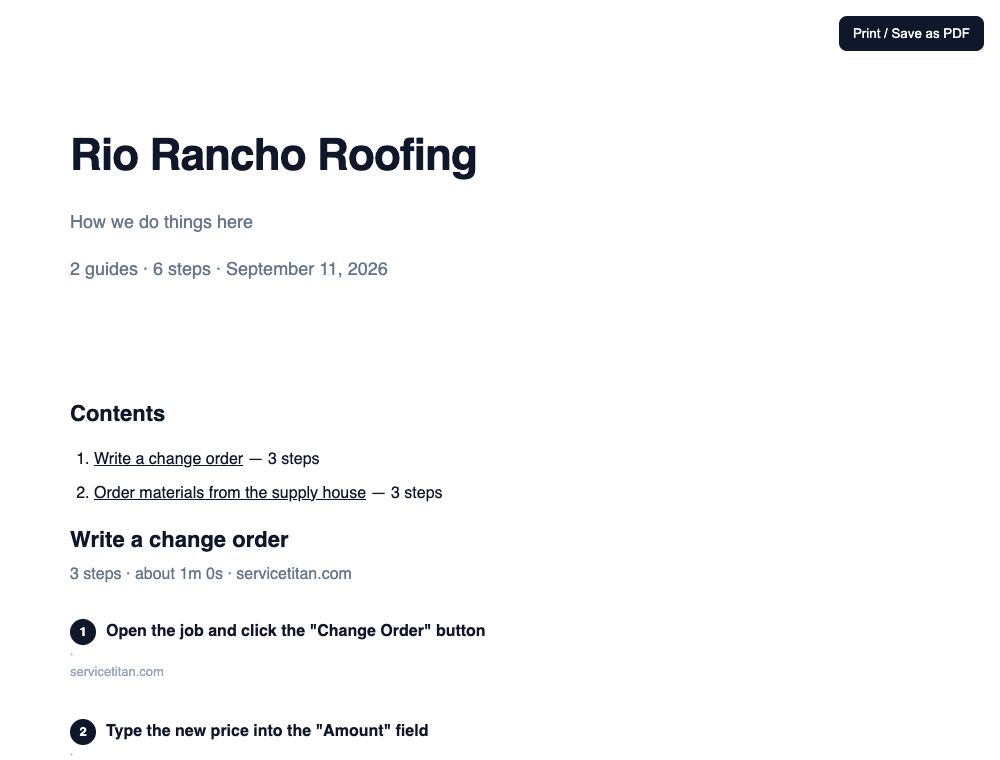
Step three has a paper version.
One button turns everything you have recorded into a handbook with your company name on the cover, a contents page, and every guide printed out with its screenshots. Hit print, put it in a binder, hand it to the new hire on day one.
Your customers’ names, addresses and prices never leave your computer.
Every screenshot Crewmanual takes is a picture of a screen full of somebody’s private information. We decided the simplest way to never lose it was to never have it.
Screenshots are never uploaded
They are stored inside your own browser, on your own machine. There is no server of ours holding them and no account to sign into.
Card numbers and keys are blanked
A step that types a card number, a PIN or an API key is written down as “value hidden” — even when the software showed it in plain text.
The answer box does not phone anyone
Questions your new hire asks are answered on that computer. We never see them, so there is no cap on how many they ask.
One price. Pay it once.
You are not signing up for another monthly bill. You already have enough of those.
| What you get | Free$0 | The manual$99 once |
|---|---|---|
| Record guides | Unlimited | Unlimited |
| Screenshots captured and cropped for you | Yes | Yes |
| Share or export one guide at a time | Yes | Yes |
| Search every guide at once | — | Yes |
| Answer box a new hire can ask questions in | — | Yes |
| Print the whole thing as a branded handbook | — | Yes |
| One-click export for ChatGPT or Claude | — | Yes |
| Crewmanual credit on what you share | Shown | Removed |
| People it covers | Everyone | Everyone, no per-seat charge |
Card or Apple Pay, handled by Polar. 30-day refund, no argument.
What the $99 does not buy
- Recording anything outside a Chrome browser on a computer — phone apps included.
- Crewmanual clicking things inside your software for you. It writes, you run the shop.
- Any cloud copy, sync or backup of your guides. They live on the machine that recorded them, on purpose.
What the alternatives cost, over a year
| Trainual | about $249 a month, ten seats | about $2,988 a year |
|---|---|---|
| SweetProcess | $99 a month | $1,188 a year |
| Waybook | $99 a month | $1,188 a year |
| Scribe or Tango | $23–35 per person per month | $276–420 per person, a year |
| Crewmanual | $99 once | $0 a year after that |
Published list prices, gathered September 2026. Shops report a setup fee on top of the Trainual number.
The questions we actually get
Does it work with the software we already use?
If it runs in a Chrome tab, yes — ServiceTitan, Jobber, Housecall Pro, JobNimbus, AccuLynx, QuickBooks, your supplier portals, your email. Crewmanual does not connect to any of them, so there is nothing to set up and nothing that breaks the week one of them pushes an update.
Is $99 really it?
One payment, your whole shop, no per-seat charge and no renewal date. Polar takes the payment and handles the sales tax as the merchant of record, so nothing of ours ever bills you again.
Where do the screenshots of my customers' jobs end up?
On your computer. They are saved inside your own browser and nowhere else. There is no Crewmanual account and no server holding your guides, which is also why we cannot recover them for you if you wipe the machine.
Can it record what my techs do on their phones?
No. Crewmanual records a Chrome browser on a computer, which is where office work happens. Field apps like CompanyCam are out of scope, and we would rather say that now than after you have paid.
What if it turns out not to fit how we work?
Email support@crewmanual.com inside 30 days and you get the $99 back, no argument and no questions about why.
Crewmanual is on the Chrome Web Store.
Recording is free. The $99 key unlocks the whole manual.
Add to Chrome — free